MaxArt AI
Pricing
Create
  • AI Video Effects
  • AI Image Effects
Models
  • Nano Banana 2.1New
  • GPT Image 2.5New
  • Seedance 2.5New
  • GPT Image 2
  • Happy Horse
  • Seedance 2.0
  • Seedream 5.0 Pro
  • OiiOii AI
  • A2E AINew
  • Google Flow

Loading...

    English
    Français
    Deutsch
    Español
    Italiano
    日本語
    한국어
    Privacy policyTerms of service

    © 2026 MaxArt.ai All rights reserved.

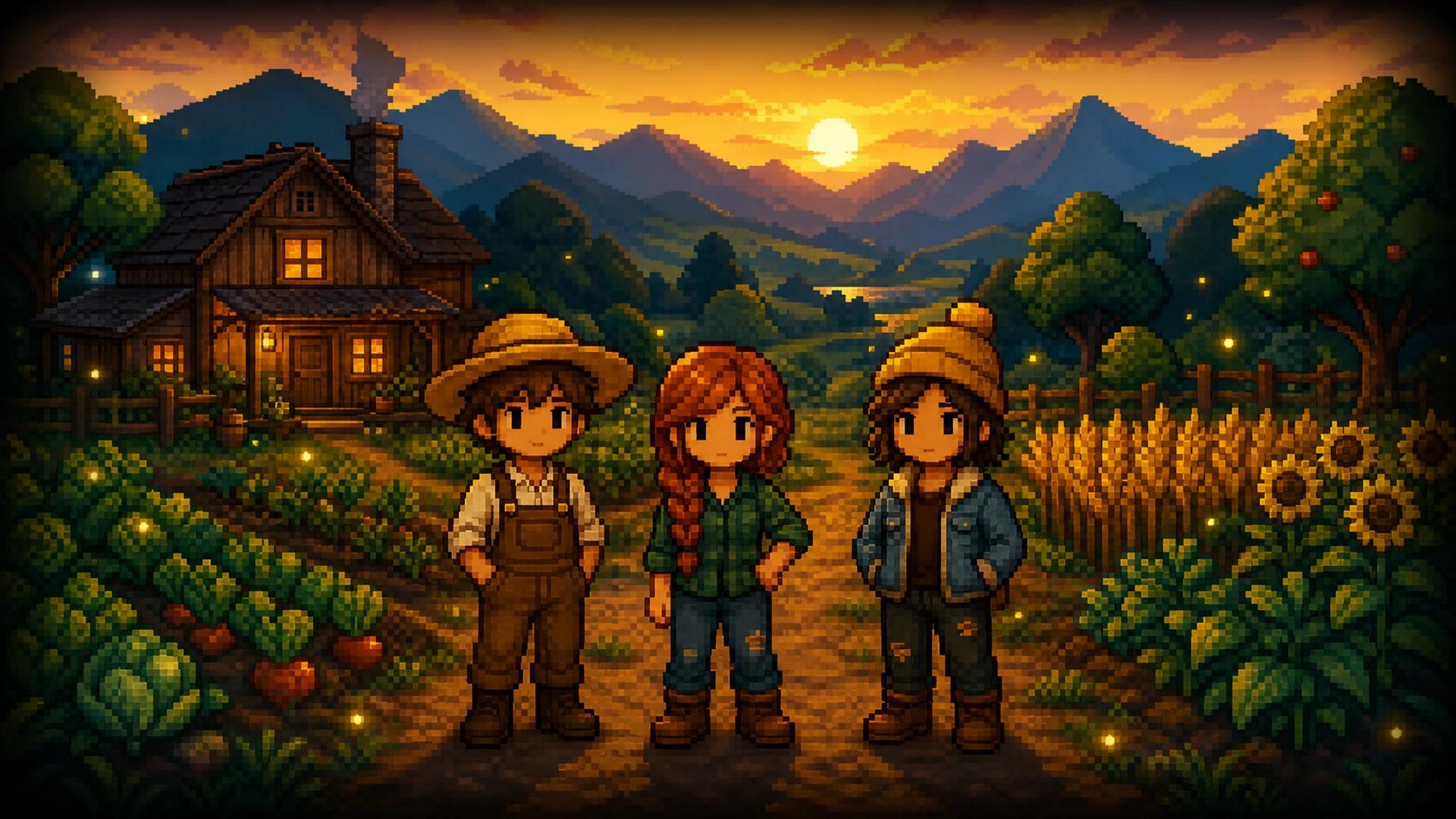
    AI Stardew Valley character generator hero visual: three original pixel-art farmers standing on a golden-hour farm path near a cozy wooden farmhouse
    1. Home
    2. AI Image Effects
    3. AI Stardew Valley Character Creator

    AI Stardew Valley Character Generator: Your Stardew Valley Character Creator

    Describe your farmer or upload one photo — the Stardew Valley character creator paints your pixel portrait in minutes

    The MaxArt Stardew Valley character creator turns anyone into a cozy 16-bit pixel portrait: bold outlines, soft countryside colors, a farm backdrop worthy of Pelican Town. Upload a selfie and the Stardew Valley character creator keeps your hairstyle, outfit, and pose — or describe your original farmer and let the Stardew Valley character creator design an OC from words alone.

    Create My Pixel PortraitSee Creator Results
    AI Stardew Valley character generator hero visual: three original pixel-art farmers standing on a golden-hour farm path near a cozy wooden farmhouse

    Three farmers painted in the Stardew Valley character creator house style — cozy pixels, bold outlines, golden-hour fields.

    Stardew Valley Character Creator: Make Your Farmer Online

    Upload a clear photo and run the Stardew Valley character creator with the tuned house prompt, or switch to text mode and describe your farmer from scratch. The Stardew Valley character creator shows the exact credit cost before you generate — 4 credits per portrait, and new accounts start with 10, so your first Stardew Valley character creator run is covered.

    Loading...

    Stardew Valley Character Creator Before and After

    Every pair below is a real Stardew Valley character creator conversion. Drag the handle to compare what the Stardew Valley character creator kept and what it repainted in pixels.

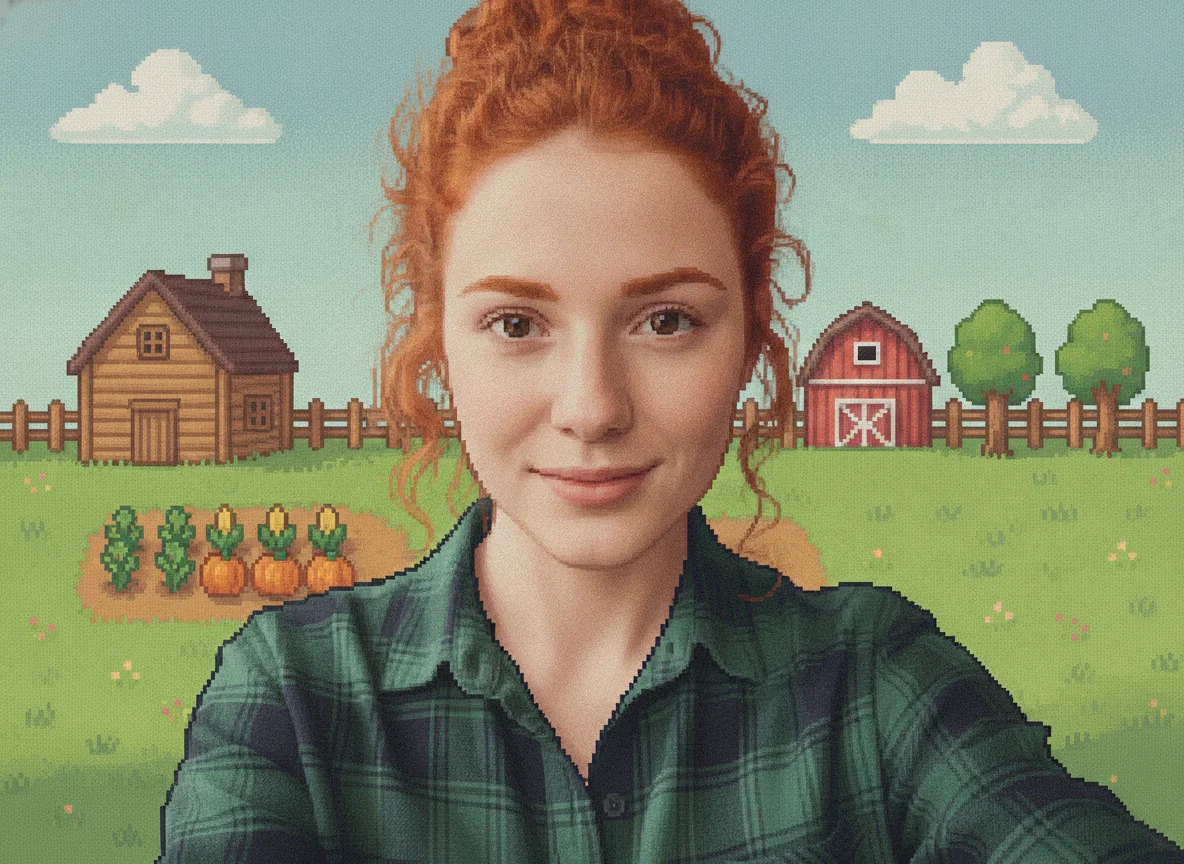
    Pixel art portrait after the Stardew Valley character creator — Cafe selfie to pixel portrait demo
    Before
    Pixel Portrait

    Cafe selfie to pixel portrait demo

    Stardew Valley character creator demo: a cafe selfie becomes a valley resident

    This Stardew Valley character creator demo starts with an everyday selfie: auburn curls in a loose bun, a green flannel shirt, soft cafe window light. The Stardew Valley character creator keeps her bun, her freckles, and the exact framing — then repaints her in chunky pixels with bold outlines, a cozy farmhouse and crop rows behind her. She is still unmistakably herself, just ready to move to Pelican Town. This Stardew Valley character creator run used the default prompt loaded in the form above.
    Pixel art portrait after the Stardew Valley character creator — Golden-hour portrait to pixel farmer demo
    Before
    Pixel Portrait

    Golden-hour portrait to pixel farmer demo

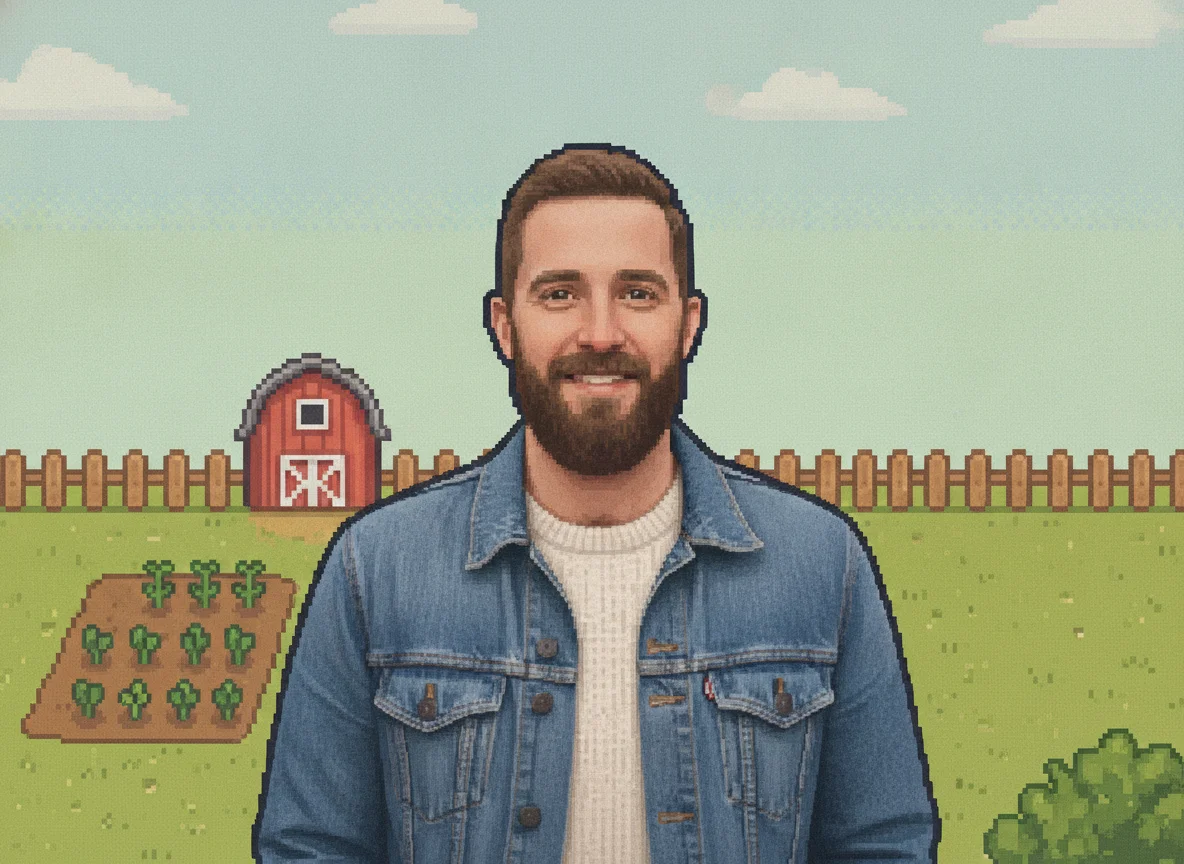
    Stardew Valley character creator demo: a bearded portrait joins the valley

    The source here is a golden-hour street portrait: a bearded man in a denim jacket over a cream sweater. This Stardew Valley character creator conversion carries the beard, the jacket, and the warm backlight into pixels, with a red barn and tilled crop rows behind him. Because the Stardew Valley character creator anchors on the photo instead of inventing a random farmer, friends recognize him at once. Every Stardew Valley character creator render is full-bleed, so the download has no frame or border.

    Pixel art portrait after the Stardew Valley character creator — Pet photo to pixel companion demo
    Before
    Pixel Portrait

    Pet photo to pixel companion demo

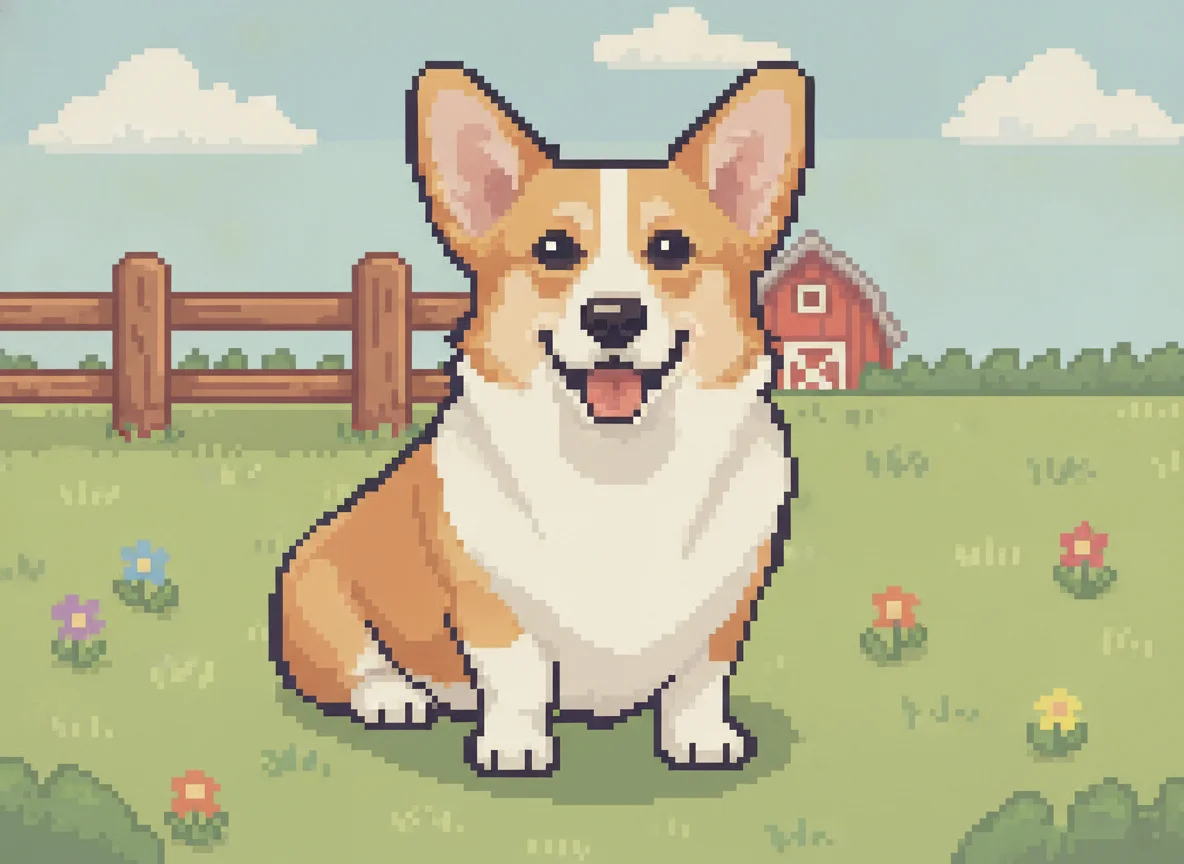
    Stardew Valley character creator demo: a corgi gets the valley treatment

    The Stardew Valley character creator is not limited to humans. This demo runs a corgi portrait through the same pixel style: the perky ears, the tan-and-white markings, and the happy expression survive as bold outlined shapes, with a wooden fence and wildflowers behind him. The game lets every farmer pick a cat or a dog at the start — the Stardew Valley character creator finally gives that companion a proper portrait. For a group-chat mascot, a pet run through the Stardew Valley character creator is hard to beat.

    What Players Use the Stardew Valley Character Creator For

    Avatar pictures, in-game farmer portraits, original characters, gifts — six jobs players actually run through the Stardew Valley character creator.

    🎮

    Profile pictures for Discord, Twitch, and forums

    A Stardew Valley character creator portrait stays readable at avatar size: bold shapes, flat colors, one clear face. Run a favorite selfie through the Stardew Valley character creator and you get a profile picture that stands out in any feed.

    🖼️

    A dialogue portrait for your in-game farmer

    The vanilla game never gives your farmer a portrait — only villagers get them. Pair a Stardew Valley character creator portrait with the community Farmer Portraits mod and your farmer finally shows up in dialogue boxes.

    ✏️

    Design Stardew-style OCs from scratch

    Switch the Stardew Valley character creator to text mode, describe hair, outfit, and personality, and iterate until the OC matches the one in your head — a fast sketchpad for fan fiction and roleplay profiles.

    🍂

    Seasonal and festival variants

    Players remake their farmer for winter, festivals, and year-two milestones. Each Stardew Valley character creator run costs 4 credits, so a four-season portrait set for your farmer stays an easy weekend project.

    🎁

    Gifts for Stardew-obsessed friends

    A pixel portrait of a friend as a valley farmer lands far better than a stock card. The Stardew Valley character creator outputs full-size images that drop straight into prints, mugs, and birthday posters.

    📺

    Stream and PNGtuber branding

    A Stardew Valley character creator portrait works as a channel icon, an emote base, or a PNGtuber persona — run the Stardew Valley character creator on the same photo each season to keep the character consistent.

    How the Stardew Valley Character Creator Works

    Three steps from photo or idea to pixel portrait — one Stardew Valley character creator run takes just a few minutes.

    1

    Upload a photo or describe your farmer

    Start the Stardew Valley character creator with a sharp, well-lit photo where the subject faces the camera — or switch to text mode and describe hair, outfit, and vibe. Pets work too.

    2

    Tune the prompt

    The default Stardew Valley character creator prompt is tuned for the cozy 16-bit look: chunky pixels, bold outlines, soft countryside colors. Edit the words to steer clothing, season, or mood.

    3

    Generate and download

    Run the Stardew Valley character creator and check the preview. The exact credit cost shows before you confirm — 4 credits, and new accounts start with 10, so your first Stardew Valley character creator portrait is free.

    More AI Image Effects

    AI Low Poly Generator

    AI Low Poly Generator

    Turn any photo into faceted low-poly geometric art — from 6 credits

    Add Snow to Photo

    Add Snow to Photo

    Add realistic falling snow and thick winter cover to any photo while the scene stays the same

    AI Perspective Drawing

    AI Perspective Drawing

    Generate perspective drawings from a prompt or sketch, with one, two, or three vanishing points

    AI T Shirt Design Generator

    AI T Shirt Design Generator

    Turn a plain-English idea into a custom shirt graphic: badges, slogans, and mascot art on clean backgrounds

    Comic Book Filter

    Comic Book Filter

    Turn any photo into a printed comic panel with bold ink outlines, cel shading, and halftone dots

    AI Smile Filter

    AI Smile Filter

    Add a natural, identity-true smile to any photo, from a subtle grin to a big beaming smile

    AI Image Denoiser

    AI Image Denoiser

    Remove grain, sensor noise, and JPEG artifacts from photos while keeping real detail sharp

    AI Hair Growth

    AI Hair Growth

    See yourself with longer, fuller hair from a single portrait — only the hair changes

    Stardew Valley Character Creator FAQ

    Straight answers about the Stardew Valley character creator: cost, likeness, mods, the in-game creator, and how this tool relates to the game.

    What is an AI Stardew Valley character creator?⌄
    An AI Stardew Valley character creator is an online tool that renders a Stardew Valley style pixel art portrait — 16-bit look, bold outlines, cozy countryside colors — from a text description or an uploaded photo. Unlike piece-by-piece portrait makers, this Stardew Valley character creator regenerates your actual photo: hairstyle, outfit, and pose stay intact.
    Is this Stardew Valley character creator free to use?⌄
    Your first Stardew Valley character creator portrait is free in practice: new MaxArt accounts receive 10 starter credits, and one run costs 4. Every Stardew Valley character creator run shows its exact credit cost before you confirm, so there are no surprises.
    Can’t I just use the in-game character creator?⌄
    The in-game creator edits your farmer’s sprite — hair, skin, shirt, accessories — but the vanilla game never gives your farmer a dialogue portrait; only villagers have them. A Stardew Valley character creator like this one fills exactly that gap, and it also renders friends, OCs, and pets the in-game creator was never meant to cover.
    Will my Stardew Valley character creator portrait still look like me?⌄
    Yes — the Stardew Valley character creator anchors on your photo and keeps hairstyle, outfit colors, pose, and framing. Keep expectations pixel-realistic: the style simplifies faces into dot eyes and bold shapes, so likeness comes from hair and clothing more than facial detail.
    Can I use the portrait in a Stardew mod or on my stream?⌄
    Yes for personal projects: players commonly pair Stardew Valley character creator portraits with the community Farmer Portraits mod so the farmer appears in dialogue, and streamers use them as channel icons. The download is a standard image file that any portrait mod workflow accepts.
    Can the Stardew Valley character creator make OCs without a photo?⌄
    Yes — switch the Stardew Valley character creator to text mode and describe your character in plain words: hair, outfit, personality, season. The Stardew Valley character creator designs an original farmer or villager-style portrait from the description alone.
    What photos work best in a Stardew Valley character creator?⌄
    Sharp, well-lit, front-facing photos give the strongest Stardew Valley character creator results. Blurry shots, side profiles, and sunglasses give the model less to anchor on. When in doubt, run two photos — the Stardew Valley character creator costs only 4 credits per run.
    Is this Stardew Valley character creator affiliated with the game?⌄
    No. MaxArt is an independent AI image tool, not affiliated with, endorsed by, or sponsored by Stardew Valley or its creator ConcernedApe. This Stardew Valley character creator makes fan-style pixel art for personal, non-commercial enjoyment — profile pictures, mods for your own save, and gifts are fine; selling merch is not.

    Ready to Move to Pelican Town?

    Upload a photo or describe your farmer and let the Stardew Valley character creator paint your pixel portrait. Chunky pixels, bold outlines, cozy fields — your first Stardew Valley character creator run is covered by starter credits.

    Start Creating